¶ Incidents List
The left-pane of the Incidents page displays lists incidents under the following tabs:
- All
- Pinned
- Assigned
- Noise
The All tab displays all (Open and Closed) incidents/deviations. The Open ones display at the top and the Closed ones at the bottom.
The Pinned and Assigned incidents/deviations display in the respective tabs.
The incidents/deviations marked as Noise display in the Noise tab.
To view the Root Cause of an incident/deviation
- Click the down-arrow icon
 in the incident message. The row expands to display the Root Cause.
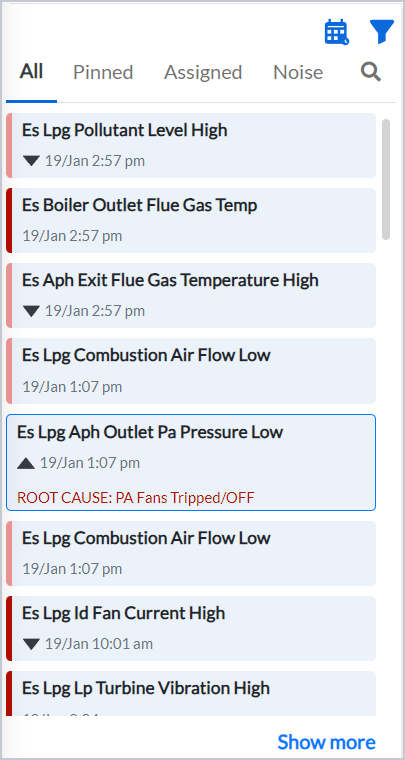
Figure 7. Incident showing the root cause upon clicking on dropdown icon
To narrow down your search for incidents,
- Click the filter icon at the top of the incidents list. The filtering criteria display.
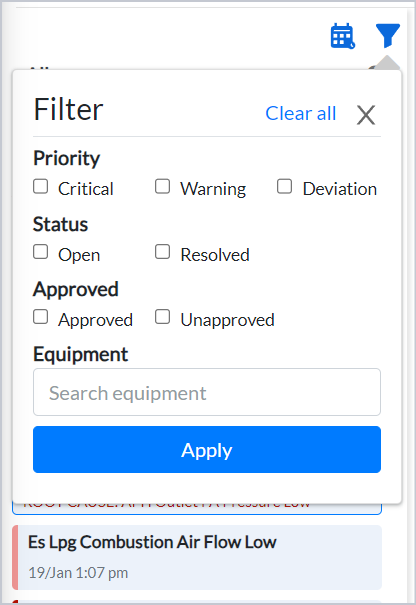
Figure 8. Filter dropdown
- Select the relevant option(s), or alternatively enter the equipment name in the Equipment field and click Apply. The Incidents List displays the search result(s).
You can also search for an incident during a specific date range.
To do this,
- Click the Date Picker icon
- Select the date range. The Incidents List displays the search result(s).